
CAD system change: More than just installing new software
A PLM Open Hour from Intelliact AG
Changing CAD systems is always a major undertaking, as CAD data is at the heart of product data. That's why existing data must be transferred to the new system with as little loss as possible and in a way that allows for optimal usability. Robust project planning and choosing the right methodology are crucial to the success of the project.
There are many reasons for changing CAD systems. It may be that the current CAD solution limits users due to technical obstacles or missing functions. Sometimes the solution is no longer suitable because a tool provider has adjusted its strategic focus or changed its market position. It is also often the case that the existing CAD solution no longer meets the requirements of a company's digitalization strategy.
In addition to the tools and providers, there are also historically grown causes and triggers for a system change within the company. For example, if a company has always had independent locations that work with different tools. In this case, it is important that the system change is supported not only on a technical level, but also on an organizational and corporate cultural level. Because no matter how good the technology is, the people who work with it are crucial to its success. Transparent communication, the involvement of all users, and highlighting the advantages promote acceptance and help to overcome reservations.
Define clear goals
Before replacing a CAD system, it is crucial to clearly define the goals to be achieved with the change. Often, the aim is to increase efficiency and optimize the cost-benefit ratio of the tools. The aim is to generate more and more precise models, create variants more efficiently, and implement changes. In order to clearly define the requirements for the new CAD system—and for the existing data in the new CAD system—it is necessary to break down CAD functionalities into the various company-specific use cases.
A relevant question here might be, for example: Does existing data that was designed in the original CAD system need to remain editable in the new system? Or: Can an assembly from the original system be opened in the new system with high performance? Once the goals have been clearly defined, it becomes apparent which approach most efficiently supports the transfer of data.
Three different approaches
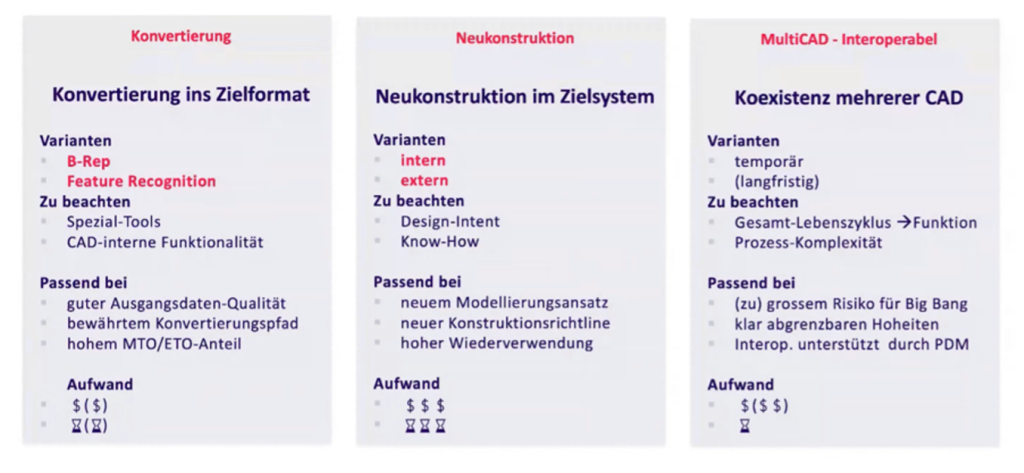
There are basically three approaches to changing CAD systems: conversion, redesign, and MultiCAD. These approaches differ in terms of duration and cost, and especially in terms of the expected data quality. The selection should always be made in consultation with the specialist departments.
Understanding your own data
One of the biggest challenges when switching CAD systems is transferring existing design data. As an “extension” of engineers and designers, the CAD system is a central component in product development. Accordingly, securing existing data and ensuring its smooth future use play a crucial role.
In order to choose the optimal replacement path, it is important to understand your own data. Is all data the same, or are there differences in behavior or requirements? Can the data be disentangled and categorized? How often is the data changed and by whom? The less the data is changed or “consumed” internally, the more likely it is that a pure B-rep (boundary surface model) of the existing data will be possible. If, on the other hand, the data is changed and used frequently, feature recognition is more likely to be the better option.
Plan strategically with a comprehensive concept
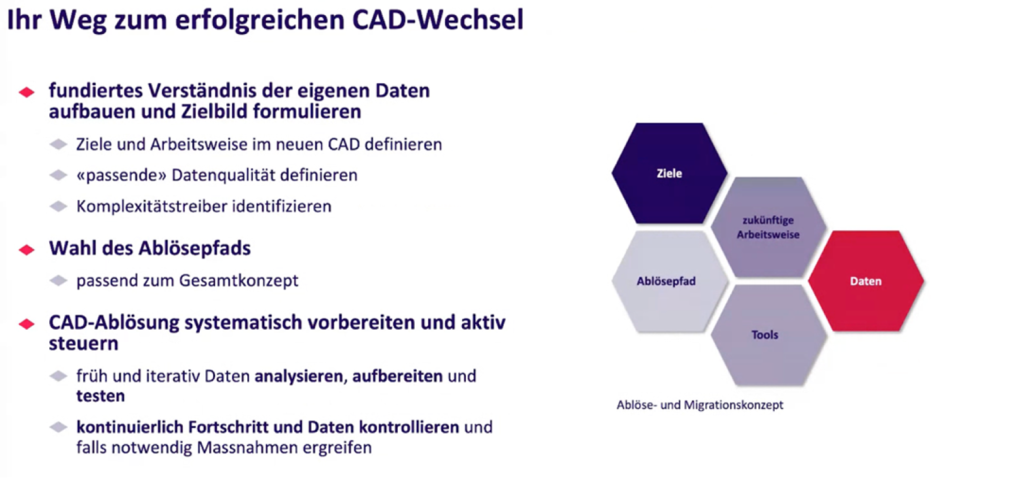
In addition to the actual replacement path, the specific goals of the company and the future working methods in the new tool are also relevant, as mentioned above. Above all, it is important to identify the necessary data with the appropriate quality. The data has different complexity drivers, which should be recorded in a well-founded replacement and migration concept. One important complexity driver is basic data quality: Are there systemic errors that need to be corrected? Other complexity drivers include the scope and selection of data, as well as fundamental changes to CAD working methods with the new system.
Don't “waste” any running time
In order not to waste time in the replacement process—e.g., because steps have to be repeated—it is important to automate the entire chain as far as possible and to incorporate iterative improvement loops. In addition, sufficient resources should be invested in the analysis (of complexity drivers) and preparation (of problem files). And last but not least, it is worthwhile to test continuously and evaluate the results meaningfully by involving end users early on and with real use cases.
Detect errors quickly, stay in control
To keep the time between error occurrence and error detection in the project as short as possible, sound planning of the project duration is essential. The duration should always be tested and extrapolated using representative data from the existing data pool. The duration and performance can also be optimized by bundling and prioritizing packages. This makes it much easier to track and calculate progress than based on the number or size of files alone. The prioritized packages also enable rolling testing of each individual package by end users. This means that not everything depends on a large user acceptance test at the end of implementation, but that it is possible to react to insufficient quality at an early stage by repeating and reimplementing entire packages.
Conclusion: Plan early and involve all stakeholders
Changing CAD systems is a strategic undertaking. Those who plan early and thoroughly, incorporate test phases, involve specialist groups and users, and communicate openly have the best chance of successfully mastering the change. After all, CAD systems are not just about software—they are about how a company designs, thinks, and works together.
PLM Open Hour Slides & Recording
Future-proof with your CAD system – how to successfully change systems
What happens to your existing data when you switch CAD systems? This question often causes uncertainty in development departments—and not without reason. Your CAD tool is an extension of your engineers and designers and a central component of your product development. Securing and ensuring the future use of existing data plays a crucial role when switching CAD systems.
In this Open Hour, we showed you how to confidently master the challenge of a CAD change. You learned:
- Which approaches you can take when changing systems.
- How to minimize risks and avoid data loss.
- Which strategies have proven themselves in practice.
Click here to view the presentation:
We recorded the webinar “Future-proof with your CAD system – how to make a successful system change.” Register here to receive the access link: